出于某些原因,我们可能需要进行WordPress后台定制,比如增删一些菜单,或者修改某些内容,下面分享下自定义排序WordPress后台管理菜单的方法。
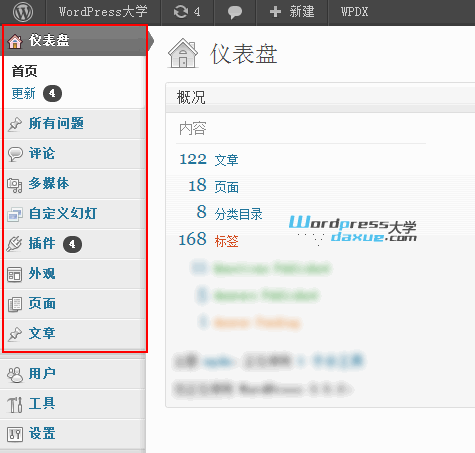
下面是一个范例,可达到本文配图的效果。将代码添加到当前主题的 functions.php 文件:
1 2 3 4 5 6 7 8 9 10 11 12 13 14 15 16 17 |
// 自定义排序WordPress后台管理菜单 (在 WP 3.5.2 测试通过) From wpdaxue.com function custom_menu_order($menu_ord) { if (!$menu_ord) return true; return array( 'index.php', // “仪表盘”菜单 'edit.php?post_type=question', // 自定义文章类型的菜单 'edit-comments.php', //“评论”菜单 'upload.php', //“多媒体”菜单 'edit.php?post_type=cmp_slider', //自定义文章类型的菜单 'plugins.php', //“插件”菜单 'themes.php', //“主题”菜单 'edit.php?post_type=page', // “页面”菜单 'edit.php', // “文章”菜单 ); } add_filter('custom_menu_order', 'custom_menu_order'); add_filter('menu_order', 'custom_menu_order'); |
// 自定义排序WordPress后台管理菜单 (在 WP 3.5.2 测试通过) From wpdaxue.com
function custom_menu_order($menu_ord) {
if (!$menu_ord) return true;
return array(
‘index.php’, // “仪表盘”菜单
‘edit.php?post_type=question’, // 自定义文章类型的菜单
‘edit-comments.php’, //“评论”菜单
‘upload.php’, //“多媒体”菜单
‘edit.php?post_type=cmp_slider’, //自定义文章类型的菜单
‘plugins.php’, //“插件”菜单
‘themes.php’, //“主题”菜单
‘edit.php?post_type=page’, // “页面”菜单
‘edit.php’, // “文章”菜单
);
}
add_filter(‘custom_menu_order’, ‘custom_menu_order’);
add_filter(‘menu_order’, ‘custom_menu_order’);
你只需复制顶级菜单的链接(只取/wp-admin/后面的部分),然后添加到 第 4 行下面的数组中,进行排序即可。
如果你不想折腾代码,可以试试 WordPress后台管理菜单编辑插件:Admin Menu Editor